Short answer:
Adding metadata to stock video manually takes 5–8 minutes per clip. For a 400-clip shoot, that’s weeks of work most videographers never finish. ShotMeta automates this — it analyses your footage, generates a title, description, and 40 keywords per clip, and outputs a ready-to-upload CSV for around $0.04–$0.05 per clip.
You’re looking at weeks of grinding through titles and keyword lists. That’s why most creators don’t bother. ShotMeta does the analysis for you, pulls out a solid title, writes a description, and spits out 40 keywords — all prepped for upload to Getty or wherever you’re selling. The cost? About a nickel per clip. At that price, you’re not losing money. You’re buying back time.
The footage is already shot and edited—metadata is what stands between it and your first sale.
You’ve done the hard work. The creative part. Now you’re staring at a file that could be generating income tomorrow if you just filled in the blanks. Literally—title, description, keywords, release forms. That’s it.
This is where most creators stall out. The footage looks perfect on your timeline but invisible on stock footage sites. Nobody finds what they can’t search for. You could have the most stunning B-roll of rain hitting pavement, but without metadata tagging it as “water droplets,” “weather,” “atmospheric,” you’re invisible.
The difference between a file earning nothing and a file earning money every quarter isn’t the quality of the shot. It’s whether someone can actually discover it when they type “urban rain” into the search bar.
Get your metadata right and you move from creator to someone with passive income. You’ll watch that same clip license three times while you’re filming something new. That’s the compound effect of finishing what you started.

Why Video Metadata Is Harder Than Photo Metadata
Photos have IPTC fields. You embed keywords directly into the file. Done.
Video breaks that system. You can’t embed metadata the same way — every platform demands its own format, its own fields, its own keyword limits. A video clip layers motion, mood, pacing, environment, and subject matter into one frame. That’s exponentially harder to describe.
- A single 10-second clip might contain aerial movement, a person walking, golden hour light, and an urban skyline
- Manual keywording eats 5–8 minutes per clip minimum
- 400 clips = roughly 40 hours of pure metadata work
- Most videographers skip it entirely. The footage sleeps on a hard drive, earning zero
The footage killing your revenue is the footage you never uploaded.
How ShotMeta Analyses Your Video
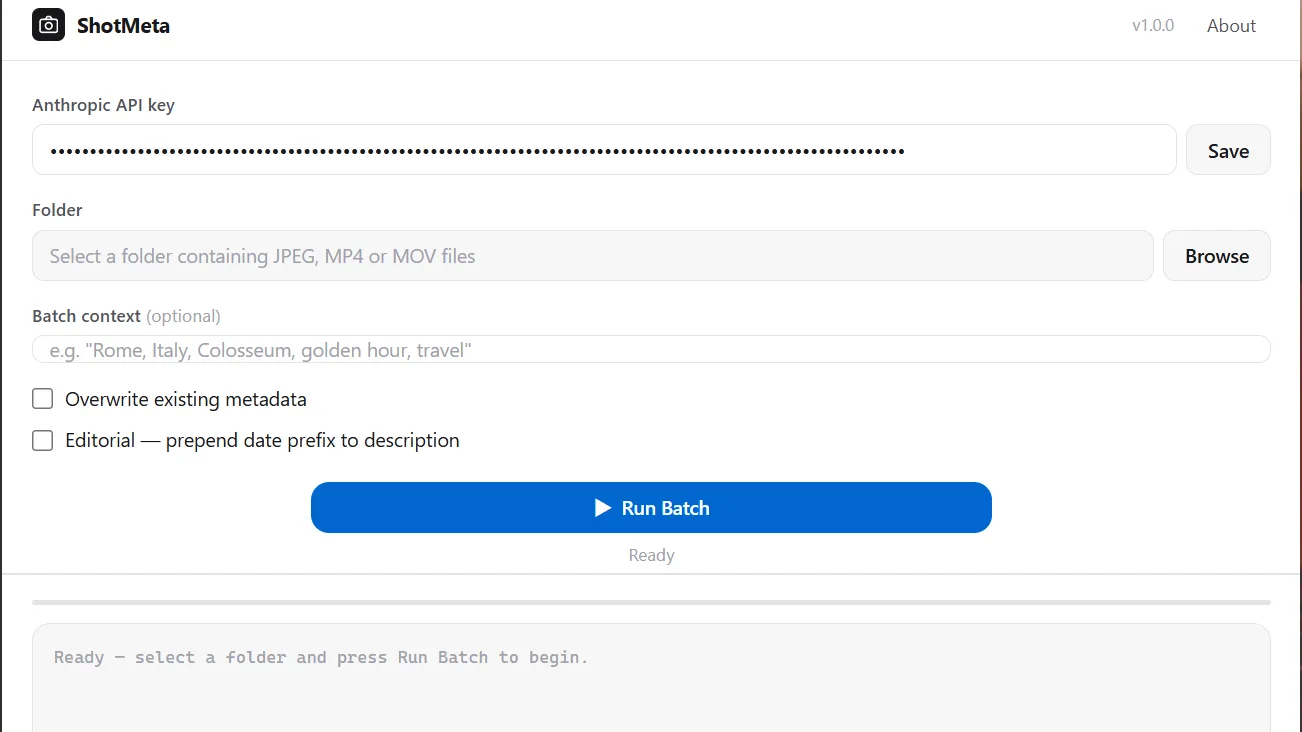
ShotMeta reads your clips instead of guessing from filenames. It’s built for people who actually shoot.
- Pull 4 frames automatically per clip across the timeline
- Analyze visual content — subjects, environment, colour, mood
- Detect movement type: aerial, handheld, timelapse, slow motion
- Generate a title, description, and 40 platform-ready keywords per clip
- Output everything as a single CSV — ready to import or paste anywhere
- Cost: $0.04–$0.05 per clip
A 400-clip shoot costs you $16–$20. One accepted clip on Getty or Adobe or Shutterstock or Pond 5pays for the entire batch.
That’s the math. Do the work once, sell it forever.
Get started → ShotMeta

What You Do With the CSV
The CSV is your deliverable. Every clip gets a row. Every row ships with title, description, and keywords already written.
- DeepMeta (Getty and iStockPhoto)— import the CSV directly, batch upload to multiple platforms at once
- Shutterstock, Adobe Stock, Pond5, Alamy — paste each CSV column into the platform fields, still 10x faster than writing metadata from scratch
- Edit individual clips before upload — the CSV stays fully editable until you hit submit
You’re probably already using AI tools in your stock workflow. ShotMeta slots right in and kills the one thing that eats your time: metadata.
What the AI Actually Gets Right
AI metadata tools live or die on accuracy. ShotMeta nails the specifics for video.
- Motion detection — aerial, slow motion, timelapse, and handheld movement get flagged correctly and show up in both keywords and description
- Multi-subject clips — it analyses 4 frames across the clip, so it catches subject changes, environment shifts, and mood swings that single-frame tools miss entirely
- Platform-standard keyword count — generates 40 keywords. That’s what Shutterstock, Adobe Stock, and the rest expect
- Keyword format — no duplicates, no stuffing, no junk padding to hit a number
You’ll hit clips where it stumbles. Abstract or heavily stylised footage usually needs your eye on it. But documentary, travel, drone, and lifestyle work? Submit it straight.
A Simple Recipe
- Browse to your clips into ShotMeta
- Let it analyse 4 frames per clip and detect motion type
- Download the generated CSV with title, description, and 40 keywords per clip
- Import the CSV into DeepMeta for batch upload — or paste column by column into your platform of choice
- Review and edit any clips where the AI output needs a human pass
- Submit and upload
The Big Truth
Unuploaded footage earns nothing. Metadata is the final gate between your hard drive and actual income.
Automate it once, upload the backlog, and let the footage work for you.